


TerraCore Construction
At TerraCore we are building a new responsive corporate website — TerraCore's primary public-facing digital experience. It needs to communicate who TerraCore is, what it does, its project experience, industries served, sustainability commitments, careers, news, and how to get in touch.
Project Overview
The TerraCore Construction project focused on creating a scalable, user-centered digital experience supported by a cohesive information architecture, intuitive user flows, and a modern design system
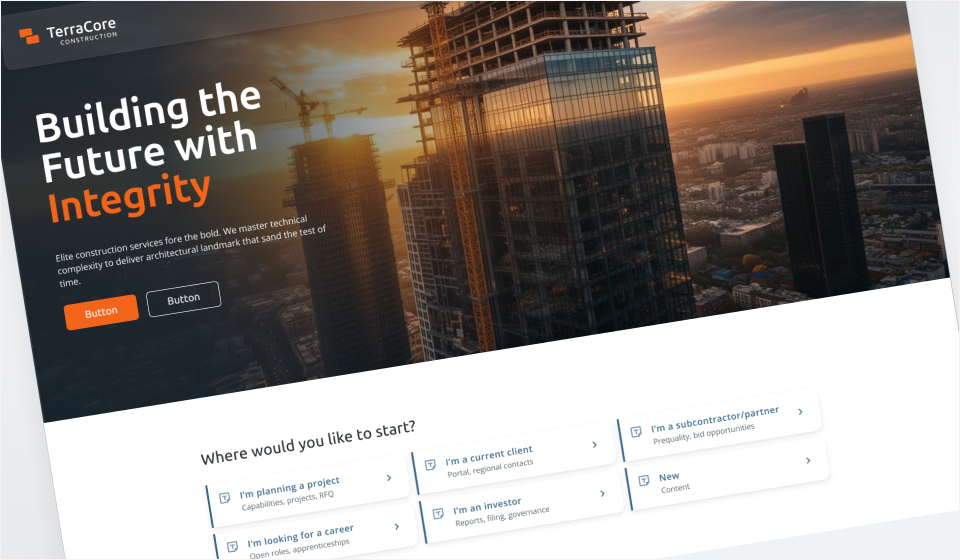
TerraCore Website Design
TerraCore is a North American construction company managing 150+ active projects across commercial, infrastructure, and industrial construction. Over time, individual product teams have built their own interfaces and workflows, resulting in inconsistent terminology,duplicated components, fragmented workflows, accessibility gaps, and a disconnected experience between corporate and field applications.
- Create a scalable digital experience that communicates capability and builds trust.
- Support business development and showcase project experience.
- Attract talent and communicate communicate corporate responsibility.
- Needs a consistent UX foundation for future digital products.
- Product designer
- UI designer
- UX design and strategist
- Information Architect
- Design Systems
- Figma
- Figma Make
- ChatGPT
- Claude
Research & Discovery
Understand the current landscape, identifying key persona’s and targeted challenges and gaps.
Personas
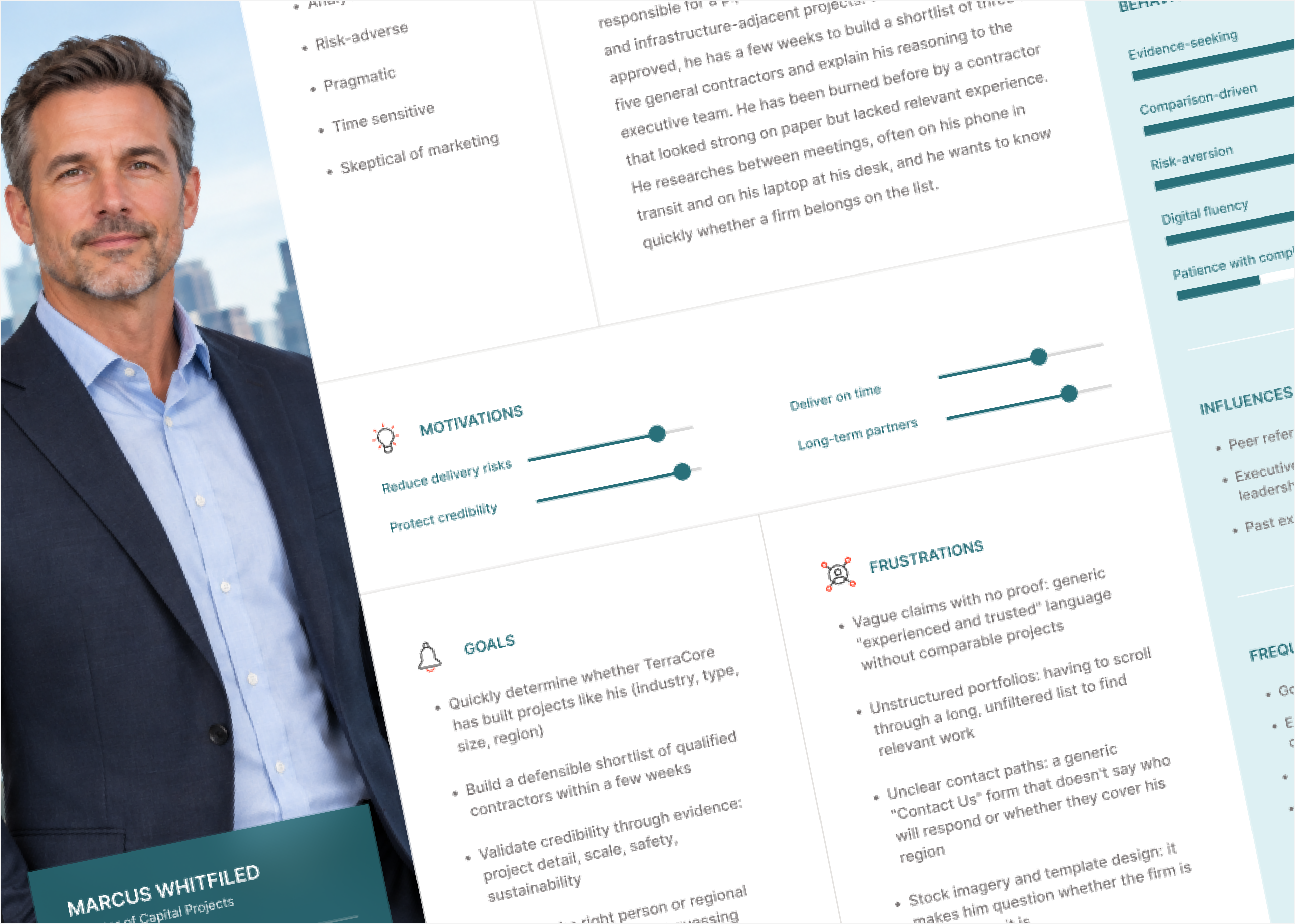
Primary persona: Prospective client
Goal: Decide whether TerraCore is a credible partner
Goal: Decide whether TerraCore is a credible partner
Additional personas:
- Existing client / partner – Find contacts, project info, news fast
- Job seeker – Find and apply to a relevant role
- Investor / corporate stakeholder – Gauge scale, leadership, governance
- General public / community – Learn about local projects and impact
Interviews
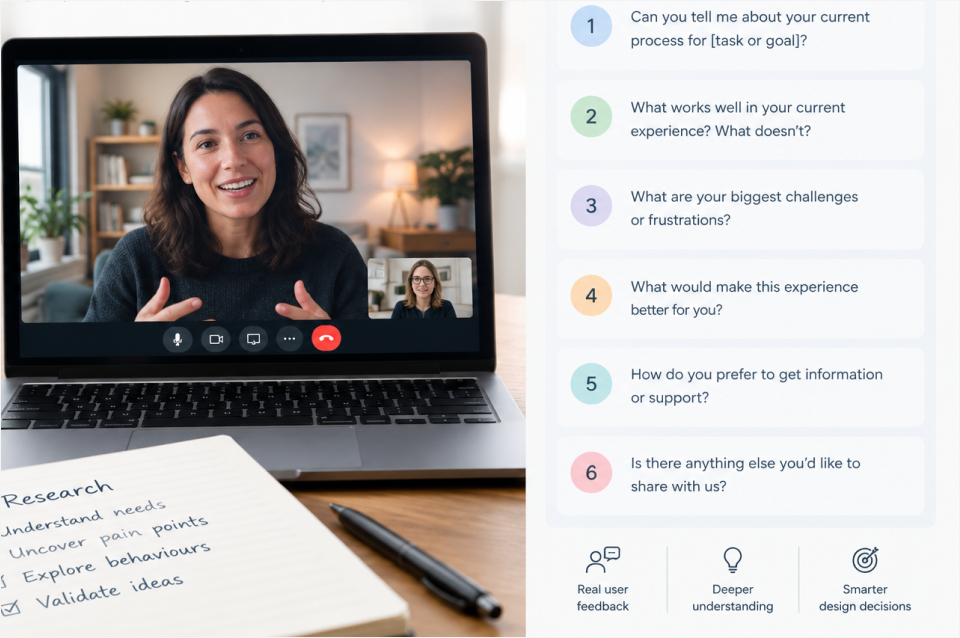
Interviews with internal and external personas
Designed for 45-60 minute semi-structured sessions with real prospective clients (owner's reps, developers, procurement leads). Questions are open-ended and avoid leading language so the answers can validate or challenge the proto-persona.
Designed for 45-60 minute semi-structured sessions with real prospective clients (owner's reps, developers, procurement leads). Questions are open-ended and avoid leading language so the answers can validate or challenge the proto-persona.
Overall structure:
- Introductions & pleasantries: Start with introductions, summary of expectations and agenda for the interview, what will be done with the information gathered, and the purpose or value.
- Warm-up: context to establish decision process, timeline, and who is involved.
- Current experience: reveals search behaviour, channels, and devices (validates the search-first and mobile/desktop assumptions) and uncovers entry points, task priorities, and scanning behaviour.
- Evaluation: what builds or breaks trust.
- Challenges and gaps: gather specific pain points and gaps without prompting for known frustrations.
- Taking action/conversion: test contact-path assumptions and identifies friction in the conversion stage.
- Influences and open feedback: invites unprompted ideas and catches blind spots.
- Closing remarks, thank yous, and follow-up expectations
Tools:
- Claude AI to evaluate question list and identify any gaps to be filled.
- Microsoft Teams to conduct 1 to 1 interviews
Content and data audit
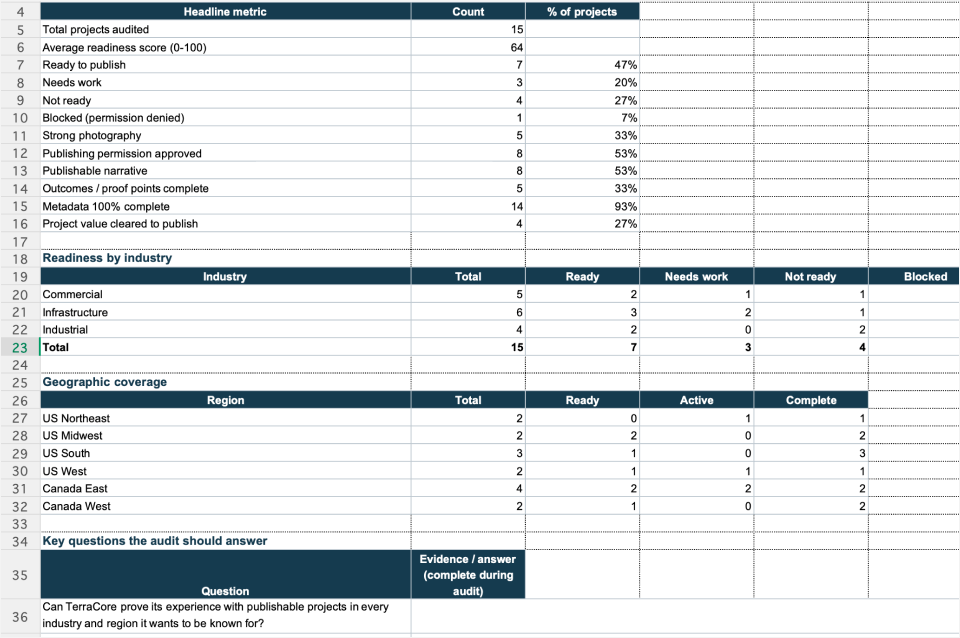
Content and data audit
Framed around the problem statement: can a visitor quickly and credibly tell whether TerraCore has the experience, scale, and capability for their project, and can they act on it? Each audit area below ties back to one of those needs.
Framed around the problem statement: can a visitor quickly and credibly tell whether TerraCore has the experience, scale, and capability for their project, and can they act on it? Each audit area below ties back to one of those needs.
Structure:
- Summary
- Project Portfolio
- Capabilities
- Corporate, credibility, and trust
- Locations and contact routing
- Terminology and taxonomy
- Assets and rights
- Digital baseline
Tools:
- Excel for documenting
- Claude AI to create the audit template
Information Architecture
The information architecture is the foundation of the website. When the structure is stable, the content becomes easier to find, navigation becomes more intuitive, and the overall user experience becomes more predictable and scalable.
Sitemap
Draft sitemap
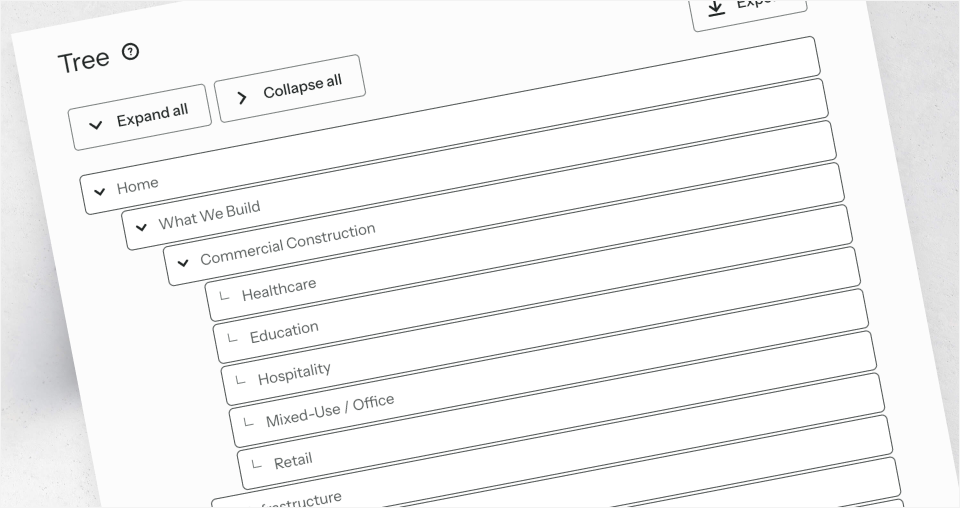
With the data and feedback collected, I created a draft sitemap to account for all the key focus areas which were identfied. I then utilized a combination of ChatGPT and Claude to provide additional insights and validations. Minor changes were applied to the draft sitemap.
With the data and feedback collected, I created a draft sitemap to account for all the key focus areas which were identfied. I then utilized a combination of ChatGPT and Claude to provide additional insights and validations. Minor changes were applied to the draft sitemap.
Tools:
- ChatGPT
- Claude AI
Tree Testing
Navigational Tree Test
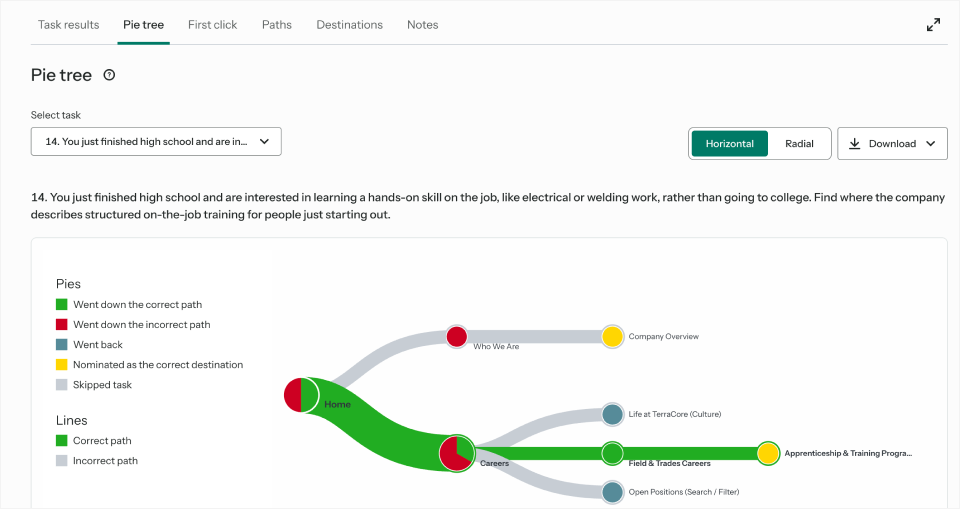
With the draft sitemap created previously, I wanted to test the structure to understand if there were any areas causing concern or any indicators of confusion for users. I set up a Tree Test using Tree Jack by Optimal. Tree Jack is a UX research method used to evaluate the findability and organization of content within a website or product’s information architecture. Participants navigate a simplified, text-based version of the site to complete tasks, helping identify confusing labels, navigation paths, and hierarchy issues before visual design is developed.
This pie tree graph as represented above, is a clear view of how users navigated the structure, where errors were made and some confusion on which direction to go. .
With the draft sitemap created previously, I wanted to test the structure to understand if there were any areas causing concern or any indicators of confusion for users. I set up a Tree Test using Tree Jack by Optimal. Tree Jack is a UX research method used to evaluate the findability and organization of content within a website or product’s information architecture. Participants navigate a simplified, text-based version of the site to complete tasks, helping identify confusing labels, navigation paths, and hierarchy issues before visual design is developed.
This pie tree graph as represented above, is a clear view of how users navigated the structure, where errors were made and some confusion on which direction to go. .
Tools:
- Tree Jack by Optimal
Flows & Journeys
visualize how users interact with the website, from their initial entry point through to completing a key task or goal.
User Flows
Persona based user flows
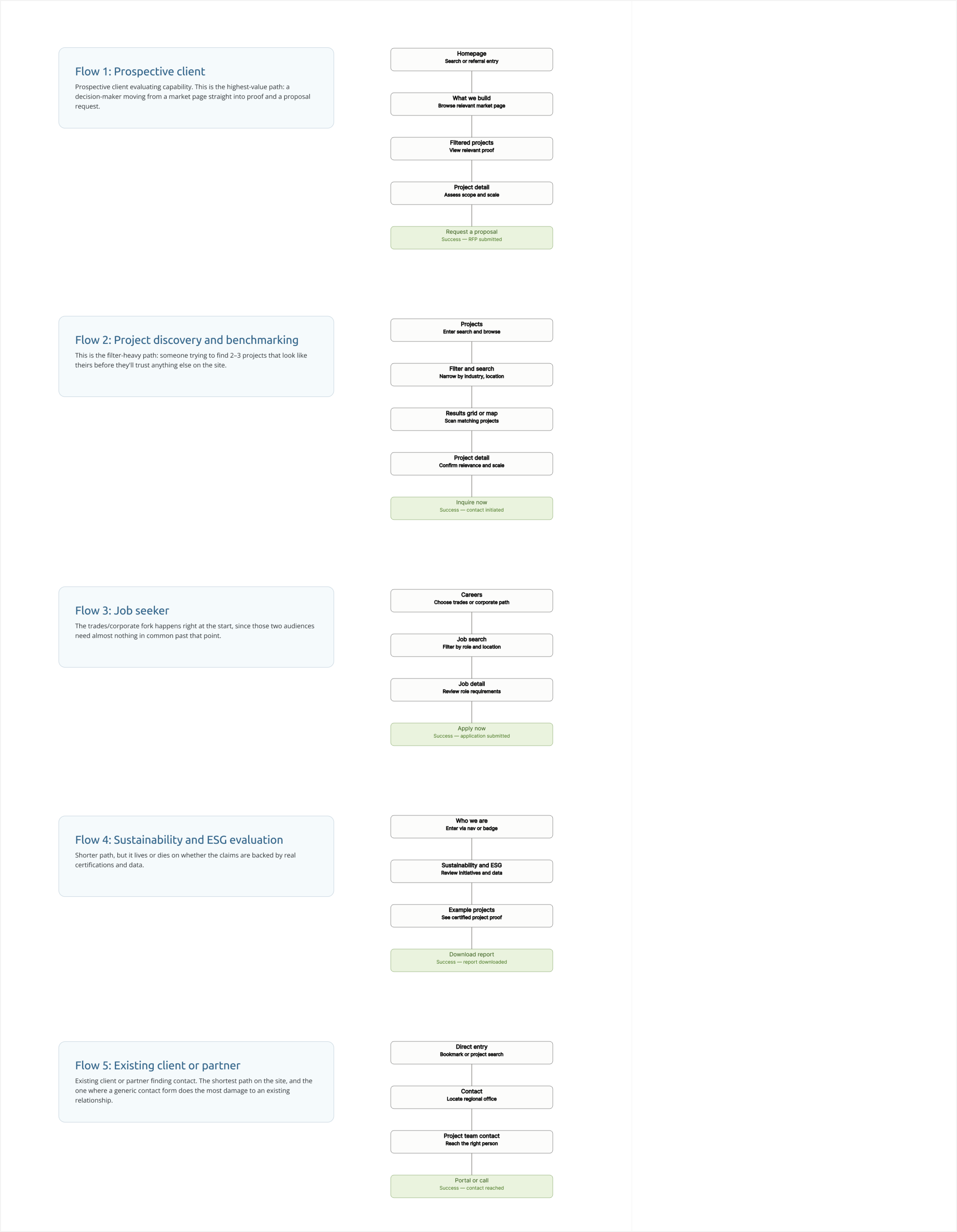
Here you see the five user flows first, each as a quick visual path through the site, followed by the primary journey map as something you can click through stage by stage.Flow 1 — Prospective client evaluating capability. This is the highest-value path: a decision-maker moving from a market page straight into proof and a proposal request.Flow 2 — Project discovery and benchmarking. This is the filter-heavy path: someone trying to find 2–3 projects that look like theirs before they'll trust anything else on the site.Flow 3 — Job seeker. The trades/corporate fork happens right at the start, since those two audiences need almost nothing in common past that point.Flow 4 — Sustainability and ESG evaluation. Shorter path, but it lives or dies on whether the claims are backed by real certifications and data.Flow 5 — Existing client or partner finding contact. The shortest path on the site, and the one where a generic contact form does the most damage to an existing relationship.
Here you see the five user flows first, each as a quick visual path through the site, followed by the primary journey map as something you can click through stage by stage.Flow 1 — Prospective client evaluating capability. This is the highest-value path: a decision-maker moving from a market page straight into proof and a proposal request.Flow 2 — Project discovery and benchmarking. This is the filter-heavy path: someone trying to find 2–3 projects that look like theirs before they'll trust anything else on the site.Flow 3 — Job seeker. The trades/corporate fork happens right at the start, since those two audiences need almost nothing in common past that point.Flow 4 — Sustainability and ESG evaluation. Shorter path, but it lives or dies on whether the claims are backed by real certifications and data.Flow 5 — Existing client or partner finding contact. The shortest path on the site, and the one where a generic contact form does the most damage to an existing relationship.
Tools:
- Claude
Journey Map
Mapping and Sentiment
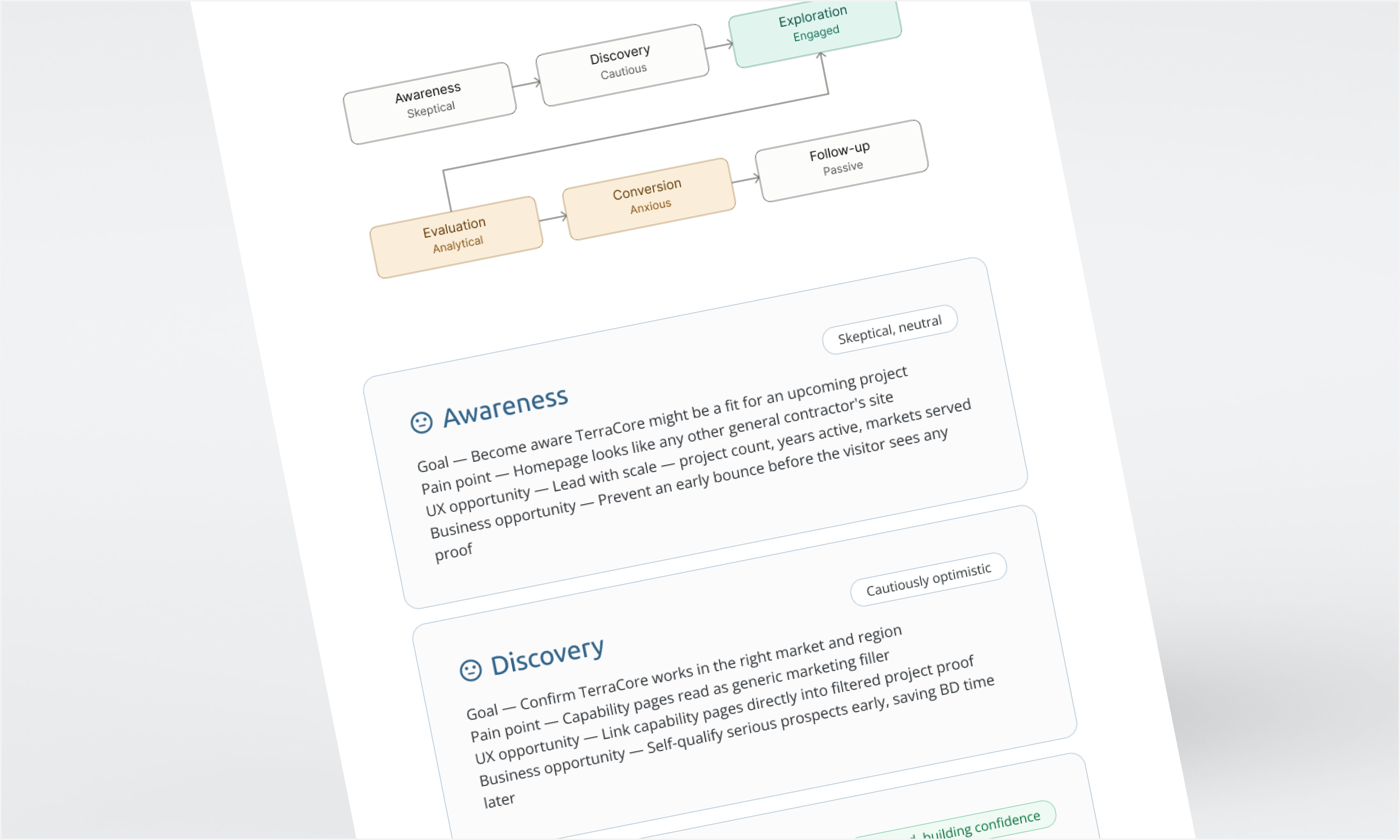
Colour marks the emotional arc: gray for neutral stages, teal at the confidence peak (Exploration), amber where risk-aversion and anxiety spike (Evaluation to Conversion).
Colour marks the emotional arc: gray for neutral stages, teal at the confidence peak (Exploration), amber where risk-aversion and anxiety spike (Evaluation to Conversion).
Tools:
- Claude
Low Fidelity Wireframes
Low-fidelity wireframes provide a quick, focused way to explore layout, hierarchy, and user flow without the distraction of visual design. They make it easier to identify and resolve structural issues early, before investing time in high-fidelity design and development.
Wireframing
Low-Fidelity Wireframes
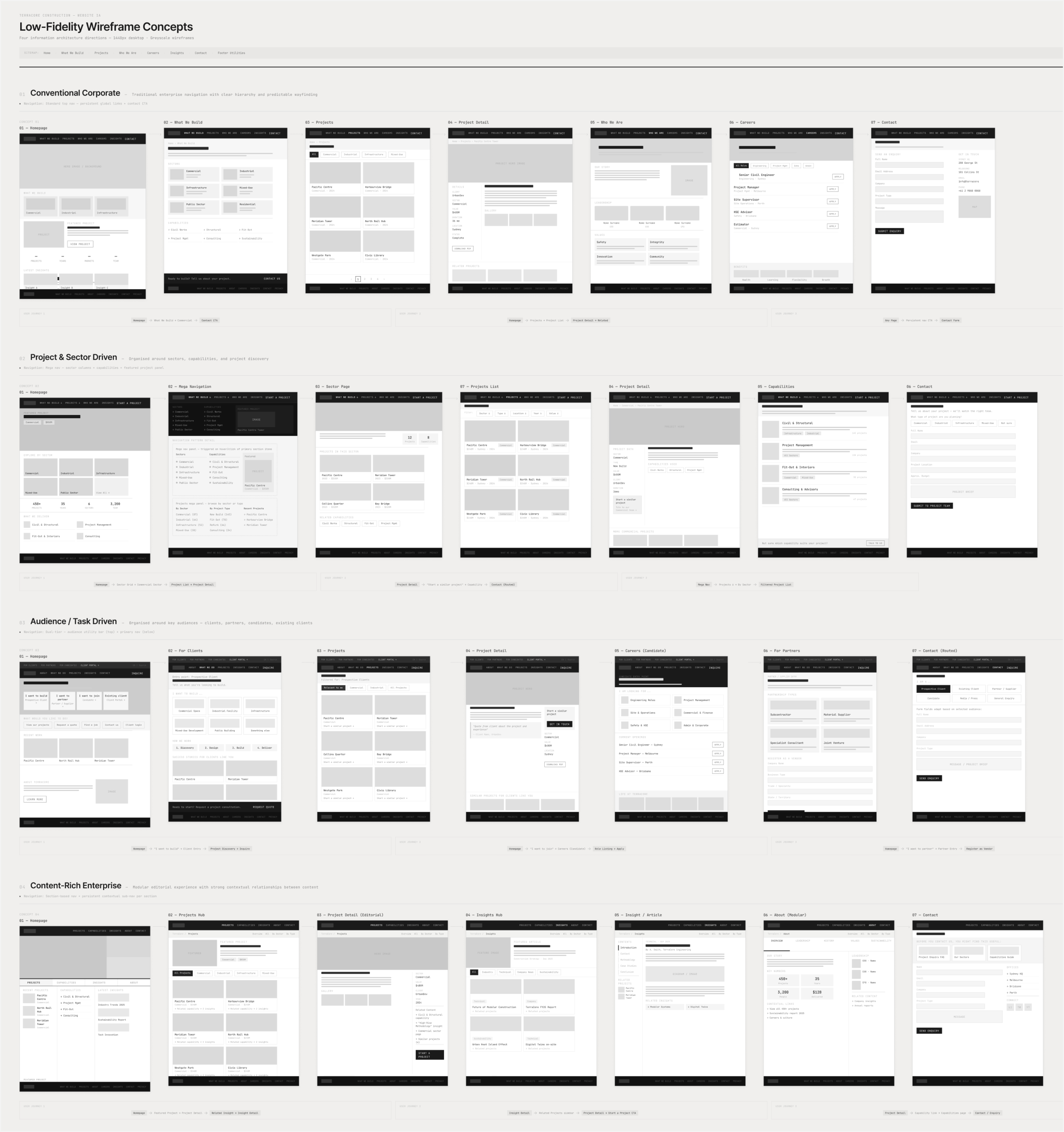
By creating low-fidelity wireframes, I was quickly and easily able to map out the site architecture with common design patterns. I first started in ChatGPT where I polished my prompt message intended for Claude. By identifying: role, objective, context, source materials, users, IA, user flows, page requirements, navigation, functionality, fidelity, visual constraints, accessibility, references, guardrails, output, and validation in my prompt, I was able to maximize prompt efficiency reducing the need for ongoing edits and minor adjustments.
Wireframes were iterated and narrowed down to 3 options. Too many options can quickly become overwhelming and difficult to define benefits of one pattern over another.
By creating low-fidelity wireframes, I was quickly and easily able to map out the site architecture with common design patterns. I first started in ChatGPT where I polished my prompt message intended for Claude. By identifying: role, objective, context, source materials, users, IA, user flows, page requirements, navigation, functionality, fidelity, visual constraints, accessibility, references, guardrails, output, and validation in my prompt, I was able to maximize prompt efficiency reducing the need for ongoing edits and minor adjustments.
Wireframes were iterated and narrowed down to 3 options. Too many options can quickly become overwhelming and difficult to define benefits of one pattern over another.
Tools:
- ChatGPT
- Claude
Iterate & Evaluate
Homepage Wireframe
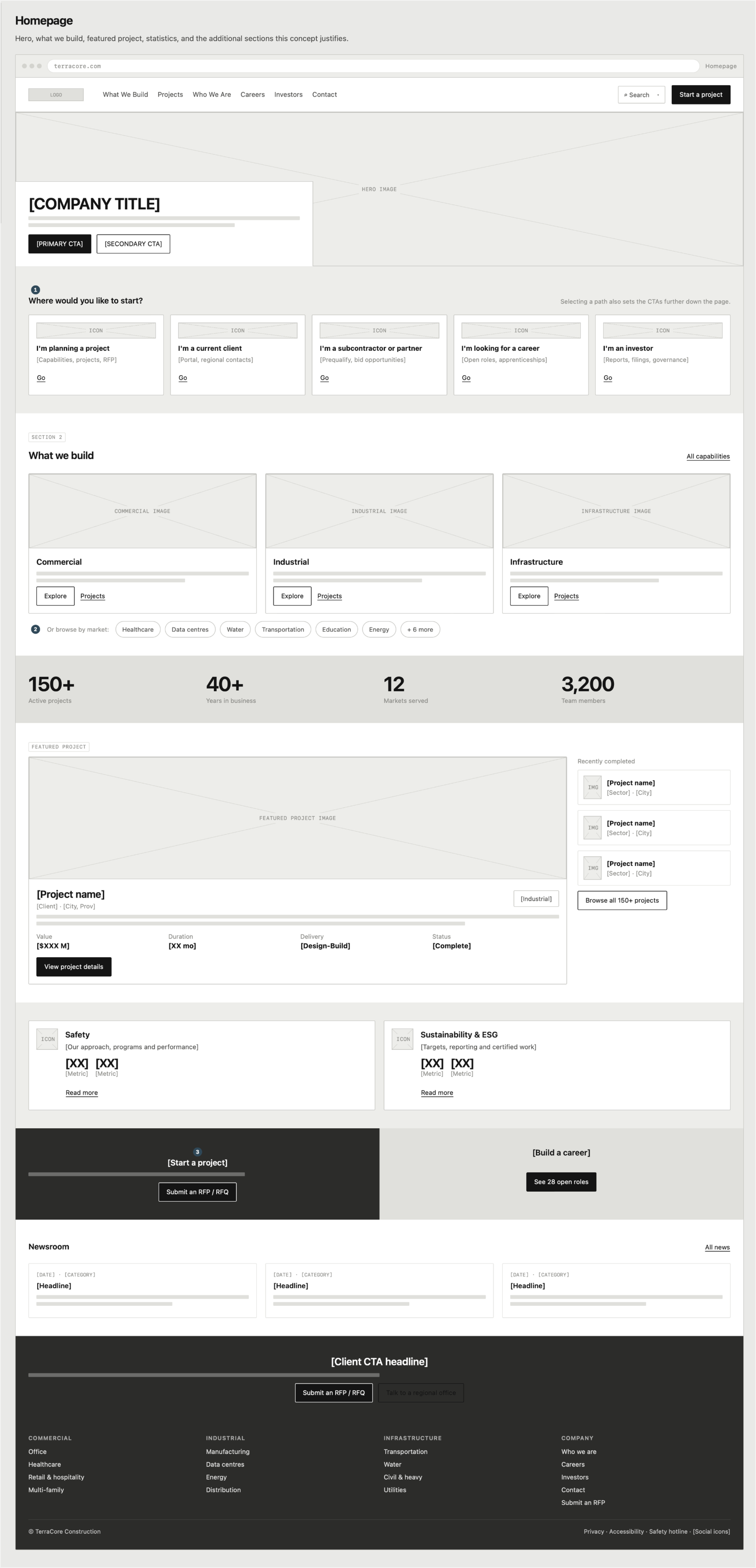
Working with stakeholders and discussing benefits and impacts of key design patterns, we came to a final low-fidelity output.
Working with stakeholders and discussing benefits and impacts of key design patterns, we came to a final low-fidelity output.
Tools:
- Claude
High Fidelity
High-fidelity designs transform validated wireframes into polished, realistic interfaces that incorporate visual design, branding, typography, imagery, interaction states, and responsive behaviour. They provide a close representation of the final product, allowing stakeholders and users to evaluate both the experience and visual execution.
Design System
(in progress)
Design System
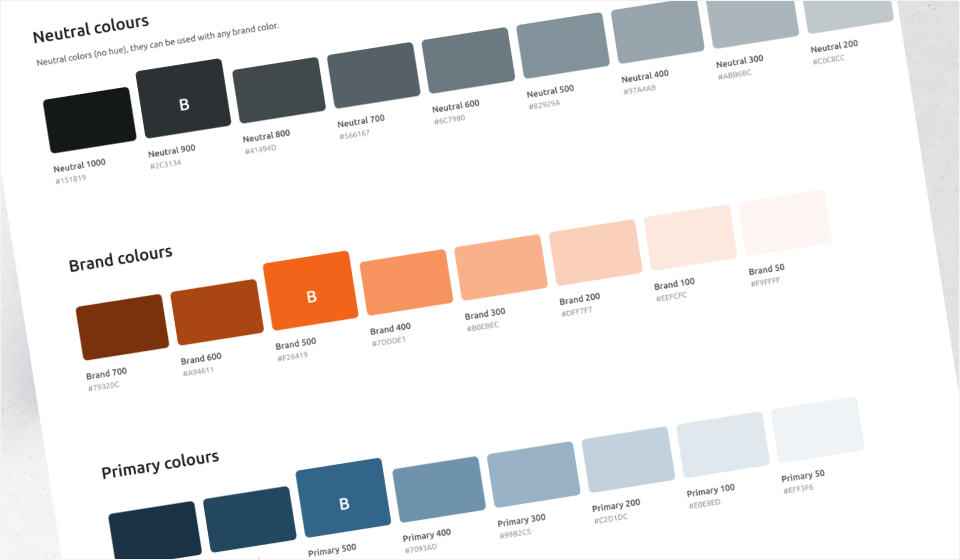
A modern design system brings together reusable design tokens, styles, and components to create a consistent, scalable, and accessible product experience. It establishes a shared foundation for visual language and interaction patterns while enabling teams to design and build more efficiently.
A modern design system brings together reusable design tokens, styles, and components to create a consistent, scalable, and accessible product experience. It establishes a shared foundation for visual language and interaction patterns while enabling teams to design and build more efficiently.
Tools:
- Figma
Website
(in progress)
Website concept
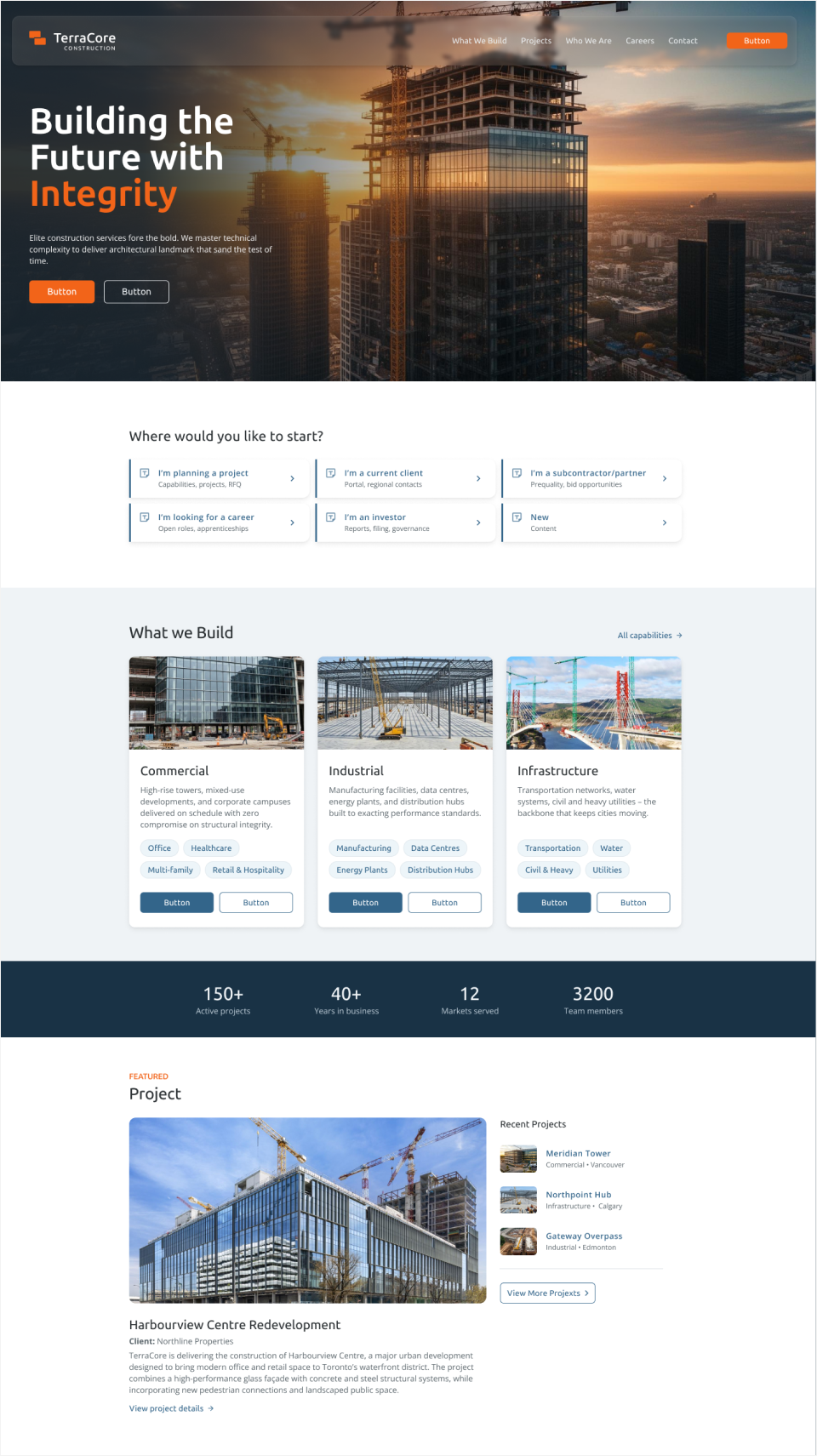
Incorporating the TerraCore design system, Figma Make effectively create a beautiful high-fidelity website. Refinements and small adjustments were necessary to get the polished end result the client was looking for. We continue today to adjust the design system and the final website while making the most of the AI designs tools we have to ensure efficiency and consistency.
Incorporating the TerraCore design system, Figma Make effectively create a beautiful high-fidelity website. Refinements and small adjustments were necessary to get the polished end result the client was looking for. We continue today to adjust the design system and the final website while making the most of the AI designs tools we have to ensure efficiency and consistency.
Tools:
- Figma
- Figma Make